> ## Documentation Index
> Fetch the complete documentation index at: https://support.visualcare.com.au/llms.txt
> Use this file to discover all available pages before exploring further.
# Rosters and timesheets reports
> Run reports on rostering conflicts, service hours, timesheets and shift data
Visualcare provides a comprehensive set of reports for rostering and timesheet data. These reports help you identify conflicts, track billable hours, compare rostered versus actual hours, and analyse service delivery patterns.
Access these reports from **Reports** → **Rostering Reports** and **Timesheets** → **Timesheets** in the main menu.
## Rostering reports
The following reports are available under **Reports** → **Rostering Reports**.
### Conflicts
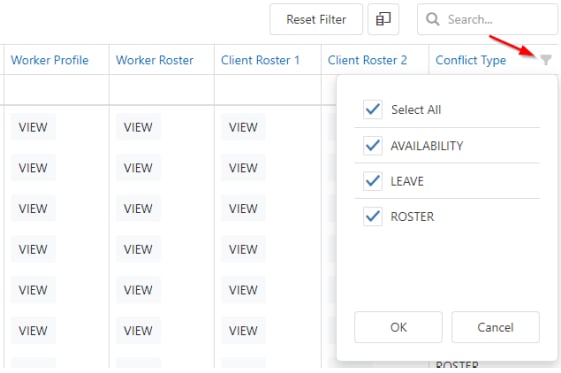
This report highlights any roster conflicts. A conflict falls into one of three categories:
| Conflict type | Description |
| --------------------- | --------------------------------------------------------------------------------- |
| Availability conflict | A worker's availability has changed and now conflicts with a rostered appointment |
| Leave conflict | A worker's leave has changed and now conflicts with a rostered appointment |
| Roster conflict | Time overlaps or insufficient time between two shifts for the same worker |
 ### Other rostering reports
| Report | Description |
| ---------------------------------- | ------------------------------------------------------------------------------------------------------------------------------------------------------------------------------------------------- |
| Public Holidays | Highlights any shifts scheduled on a public holiday. Make sure your state is set up correctly in the settings area |
| Cancelled Shifts / Shifts on Leave | Highlights any shifts that have been cancelled or marked as on leave |
| Billable Hours Summary | Reports on all billable hours for a selected date range, sorted by funding type with totals for different payroll periods |
| Movement Report | Shows the difference between cancelled shift hours and non-cancelled shift hours between a chosen period |
| Payer High Level | Reports on how many hours a payer is expected to pay between a given date period, based on timesheets. Displays total hours, on-hold hours and the remainder for each month within the date range |
| Roster Hours vs Actual | Compares rostered hours against actual hours by support worker for a selected timeframe |
| Roster Notes Report | Reports on all roster notes entered during rostering |
| Roster Hours by Category | Summarised list of client hours by roster category. Roster categories are used when rostering services to break shifts down by different reporting mechanisms |
| No Service Report | Reports on clients who do not have any shifts in rosters |
| Series Shift Report | Select a date range to view all shift series for all clients |
### Client services provided
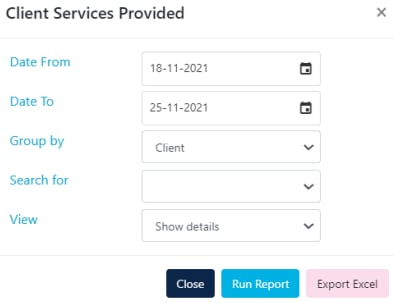
This report shows confirmed client services (timesheets) for a selected timeframe. You have several options:
* Group by **Client**, **Payer** or **Service**
* Choose **Show Details** or **Totals Only**
* Export to Excel or run as an on-screen report
### Other rostering reports
| Report | Description |
| ---------------------------------- | ------------------------------------------------------------------------------------------------------------------------------------------------------------------------------------------------- |
| Public Holidays | Highlights any shifts scheduled on a public holiday. Make sure your state is set up correctly in the settings area |
| Cancelled Shifts / Shifts on Leave | Highlights any shifts that have been cancelled or marked as on leave |
| Billable Hours Summary | Reports on all billable hours for a selected date range, sorted by funding type with totals for different payroll periods |
| Movement Report | Shows the difference between cancelled shift hours and non-cancelled shift hours between a chosen period |
| Payer High Level | Reports on how many hours a payer is expected to pay between a given date period, based on timesheets. Displays total hours, on-hold hours and the remainder for each month within the date range |
| Roster Hours vs Actual | Compares rostered hours against actual hours by support worker for a selected timeframe |
| Roster Notes Report | Reports on all roster notes entered during rostering |
| Roster Hours by Category | Summarised list of client hours by roster category. Roster categories are used when rostering services to break shifts down by different reporting mechanisms |
| No Service Report | Reports on clients who do not have any shifts in rosters |
| Series Shift Report | Select a date range to view all shift series for all clients |
### Client services provided
This report shows confirmed client services (timesheets) for a selected timeframe. You have several options:
* Group by **Client**, **Payer** or **Service**
* Choose **Show Details** or **Totals Only**
* Export to Excel or run as an on-screen report
 ### Monthly hours breakdown
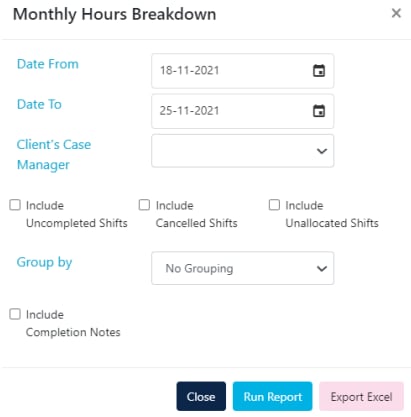
This report shows rostered items (not confirmed timesheets) for a selected date range. It's useful for forecasting upcoming months. Options include:
* Include or exclude uncompleted or cancelled shifts
* Multiple grouping options
* Export to Excel or run as an on-screen report
### Monthly hours breakdown
This report shows rostered items (not confirmed timesheets) for a selected date range. It's useful for forecasting upcoming months. Options include:
* Include or exclude uncompleted or cancelled shifts
* Multiple grouping options
* Export to Excel or run as an on-screen report
 ### Service summary reports
| Report | Description |
| --------------------------------- | ---------------------------------------------------------------------------------------------------------------------- |
| Service Summary by Support Worker | View by date range, grouped by worker showing services, quantity, pay rate, charge rate, payer and client contribution |
| Service Summary by Payer | View by date range, with the option to show details or payer totals only |
## Timesheet reports
The following reports are available under **Timesheets** → **Timesheets**.
### Timesheet report
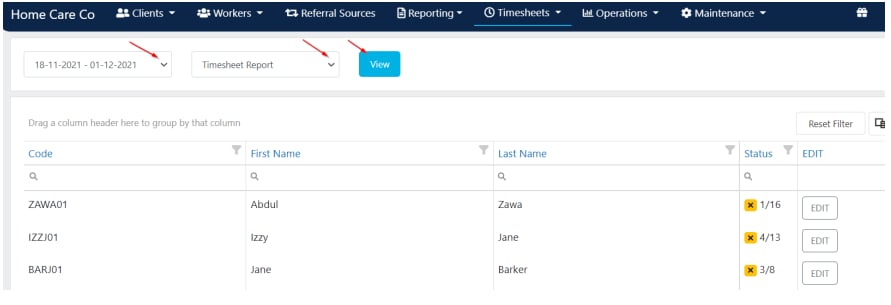
To run a timesheet report:
1. Go to **Timesheets** → **Timesheets**
2. Select the timeframe for your payroll period
3. Choose which report you want from the drop-down menu
4. Click **View**
This report shows all confirmed timesheets.
### Service summary reports
| Report | Description |
| --------------------------------- | ---------------------------------------------------------------------------------------------------------------------- |
| Service Summary by Support Worker | View by date range, grouped by worker showing services, quantity, pay rate, charge rate, payer and client contribution |
| Service Summary by Payer | View by date range, with the option to show details or payer totals only |
## Timesheet reports
The following reports are available under **Timesheets** → **Timesheets**.
### Timesheet report
To run a timesheet report:
1. Go to **Timesheets** → **Timesheets**
2. Select the timeframe for your payroll period
3. Choose which report you want from the drop-down menu
4. Click **View**
This report shows all confirmed timesheets.
 ### Other timesheet reports
| Report | Description |
| ---------------------------- | --------------------------------------------------------------------------------------------------------------------------------------------- |
| Timesheet Summary | Select a date range to see a summary of kilometres, kilometres (no charge), reimbursements, total hours and pay based on completed timesheets |
| App Started but Not Finished | Report on all shifts started by a worker on the mobile app but not finished |
| Time Discrepancy | Select a date range and filter by worker to identify consistent lateness or early departures |
The Time Discrepancy report is useful for spotting patterns where workers are consistently starting late or finishing early.
## Running into issues?
See [General troubleshooting](/troubleshooting/general) for common errors and fixes.
## Related articles
View and manage confirmed timesheets
Handle and resolve roster conflicts
Run reports on client data
Run reports on worker data
### Other timesheet reports
| Report | Description |
| ---------------------------- | --------------------------------------------------------------------------------------------------------------------------------------------- |
| Timesheet Summary | Select a date range to see a summary of kilometres, kilometres (no charge), reimbursements, total hours and pay based on completed timesheets |
| App Started but Not Finished | Report on all shifts started by a worker on the mobile app but not finished |
| Time Discrepancy | Select a date range and filter by worker to identify consistent lateness or early departures |
The Time Discrepancy report is useful for spotting patterns where workers are consistently starting late or finishing early.
## Running into issues?
See [General troubleshooting](/troubleshooting/general) for common errors and fixes.
## Related articles
View and manage confirmed timesheets
Handle and resolve roster conflicts
Run reports on client data
Run reports on worker data