
API Connection
”Server Error” on the SAH tab
Cause:- PRODA B2B devices expire every 6 months as Services Australia policy. An expired or locked device interrupts the API connection between Visualcare and PRODA, which shows as a Server Error on the client’s SAH tab.
- The API connection can also drop out or disconnect intermittently (independent of device expiry/locking). When this happens, the connection will need to be manually reconnected to restore the link between Visualcare and PRODA.
1
Log in to PRODA
Select Organisations at the top right, then choose the organisation associated with the expired device.
2
Open the expired device
Go to B2B Devices, and click on the name of the expired device.
3
Generate a new activation code
Select Generate New Code in the Device Details section, and record the new Device Activation Code, Device Name, and RA Number.
4
Update Visualcare
Enter the new code under Settings → Integrations. Status will show Pending.
5
Reconnect
Click Manage in the Integrations tab and upload the original AC027 form, named “Visualcare AC027 - Support at Home”, to move the status from Pending to Connected.
What a Server Error does and doesn’t affect
A Server Error interrupts the flow of budget and balance data from Services Australia, but it doesn’t stop you working. Not affected - these continue to work as normal:- SAH claiming, including via CSV
- SAH invoicing
To restore accurate data: reconnect the B2B device using the steps above, then contact the Visualcare support team to request a budget refresh across all three affected areas.
PRODA claiming errors
When you submit a SAH claim batch, PRODA may return one or more error messages against individual line items. The errors below describe the most common messages, what causes them, and how to fix them. Symptoms: One or more line items in your claim batch are rejected by PRODA with error messages against individual service items. Cause: Errors are typically caused by incorrect date formatting in the CSV, missing or wrong service codes on the Service Identifier, invalid unit types, or participant details that don’t match the PRODA record. Fix: Review the error message for each rejected item using the table below, correct the relevant field in Visualcare or in the CSV, then resubmit the claim.Payment file upload errors
When reconciling a Support at Home (SAH) claim, uploading the payment details CSV file from Services Australia can return one of the errors below.”Unable to parse payment file. Please try again later”
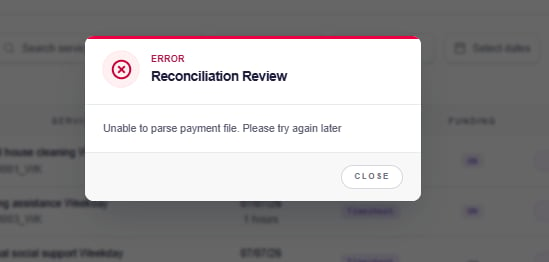
Fix: Follow the steps for the cause you found.
Adjustment or amendment lines
Visualcare doesn’t currently support adjustment or amendment entries in payment details uploads. Decide whether to remove the adjustment lines yourself or send the file to the Visualcare helpdesk team.- Option 1: Remove the adjustment lines
- Option 2: Send the original file
Use this option if you’re comfortable identifying and removing the affected rows, for example where there are only a few.Create a helpdesk ticket and attach the original, unedited payment details CSV file so the lines can be applied to the correct claim file. Adjustments and amendments may relate to past claim periods, not just the current one.
1
Open the file
Open the payment details CSV file in a spreadsheet application.
2
Identify the adjustment rows
Identify any rows marked as an amendment or adjustment and previous, along with the related lines directly below each item.
3
Delete the rows
Delete those rows from the file.
4
Save the file
Save the file as a CSV.
5
Re-upload in Visualcare
Re-upload the cleaned CSV in Visualcare. The claim will now reconcile.
6
Raise a helpdesk ticket (Optional)
This step is optional. Only complete it if you want adjustment or amendment lines reflected in Visualcare.
Whichever option you choose, keep a copy of the original payment details CSV file. Adjustment history isn’t stored in Visualcare, so this forms part of your audit trail. See SAH payment adjustments for more on handling under and overclaims.
AS - Assistive Technology Specified Needs funding type
This funding type needs to be enabled in your Visualcare database before the file can be read. Don’t remove the lines from the file, as the items would return to Ready to claim and could be claimed twice. Create a helpdesk ticket, attach the original payment details CSV file and include the claim ID. Once the funding type is enabled, re-upload the original file.File doesn’t belong to this claim
Download the payment details file that matches this claim from the Aged Care Claiming Portal and upload that file instead.File has been edited or resaved
Download a fresh copy of the payment details file from the Aged Care Claiming Portal and upload it without opening it, or open it only to delete adjustment rows as described above. Don’t add, move or reformat any other values. If the error continues after checking every cause above, create a helpdesk ticket and attach the original payment details CSV file and the claim ID.”Payment items include corrections. This is not supported.”
.png?fit=max&auto=format&n=evgWvU9SlI44ahKN&q=85&s=7dd41deff34285cdd270236e1f1223c9 "Image 20260225 230238 (1)")
”Internal Server Error”
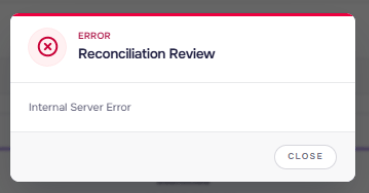
Reconciliation review messages and issues
These aren’t upload errors, but they often cause confusion during reconciliation.Items will be removed from the claim
When you upload a payment details file, Visualcare shows a review screen before applying any changes. Any claim item that isn’t in the file is removed from the claim and returned to Ready to claim. This is expected when Services Australia didn’t process an item, or when you removed items from the claim CSV before submitting it in the Aged Care Claiming Portal. If the review screen shows a large number of items being removed, check that you’ve uploaded the right payment details file and select Cancel if not.Items you removed before submitting will keep returning to Ready to claim after each reconciliation. If you don’t intend to claim them through Support at Home, change the item to a private or write-off service so it leaves the SAH claiming workflow.
”Claim item is partially funded. Reconciling will create a ‘gap’.”
This message is expected. It appears when the government and participant amounts paid for an item are less than the item’s total. After you reconcile, the item shows as Partially paid and the difference is recorded as a gap amount. Please find more information in this article SAH gap paymentsClaim Item Status not reconciling or stuck at Incomplete
Symptoms: After reconciliation, one or more items don’t update. In Data export > Timesheets or Expenses tab, the Claim Item Status column shows Incomplete, or the SAH service column is blank for the item. If the item has already been paid by Services Australia, don’t reclaim it. Create a helpdesk ticket with the claim ID and the payment details file so the item can be updated against the original claim. Cause: The link between the expense and its agreement service has been broken, so the item has no SAH service code to match against the file. Fix:1
Open the item
Open the expense or timesheet for the affected item.
2
Reselect the service
Select the correct agreement service for the item, and save.
3
Check the claim
The item returns to Ready to claim and can be included in a claim.
How to amend items claimed and paid in the Aged Care Claiming Portal
If you need to amend a service item that has already been claimed and paid through the Aged Care Claiming Portal (ACCP), this is managed directly in ACCP rather than in Visualcare. Services Australia provides a training module with step-by-step guidance on how to process amendments in ACCP. You can access it at the Services Australia ACCP amendments training module.Amendment processing in ACCP is managed by Services Australia. If you need support beyond what the training module covers, contact the Services Australia provider helpline.
Blocked invoices and invoice lines
An invoice or invoice line shows as Blocked when it’s missing information it needs before it can be exported to your accounting software. Blocked items aren’t exported. Fix the cause, then export again.“This service line is already included on a claim”
This message means the line is already part of another claim, usually a draft claim that hasn’t been submitted. To find which claim it’s in:1
Export the claim fields
Go to Timesheets → Data Export and add the Claim Ref, Claim Item Ref, Claim Item Status and Claim Status columns.
2
Check the status
3
Open the claim
Search for the Claim Ref on the SAH Claiming screen to see the claim the line is in.
Items missing from invoices or claims
Running into issues?
You can see more information on SAH adjustments in this article SAH payment adjustments. If your issue isn’t listed here, contact the Visualcare helpdesk.Related articles
Billing to SAH
How to generate and submit SAH claim files in Visualcare
SAH agreements
Setting up and managing Support at Home client agreements
SAH financials
Managing financials for Support at Home clients
Support at Home dashboards
Monitor participant and organisation-level SAH budgets