
Worker engagement details
The Engagement Details tab on a worker’s profile is where you configure award and pay rate information. If a worker is no longer current, enter their end-of-engagement details here.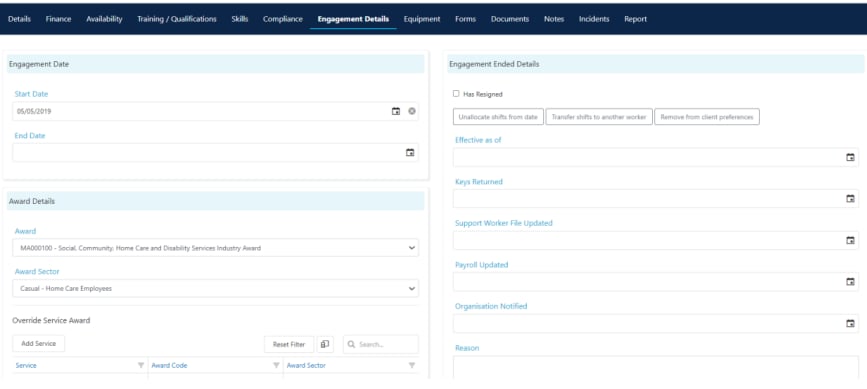
Award details
The Award Details section is where you select the specific award the worker is on. This determines which conditions and rules apply when calculating pay.Pay rate overrides
The Overrides section lets you set overrides for both award and pay rate levels on a per-service basis. This is useful when a worker is typically on one pay rate level but receives a higher level for specific services. For example, if a worker is usually on pay rate level one (under the Finance tab) but jumps to level two or three for certain services, you set this up by clicking Add Service and selecting the pay rate level they receive when providing that service.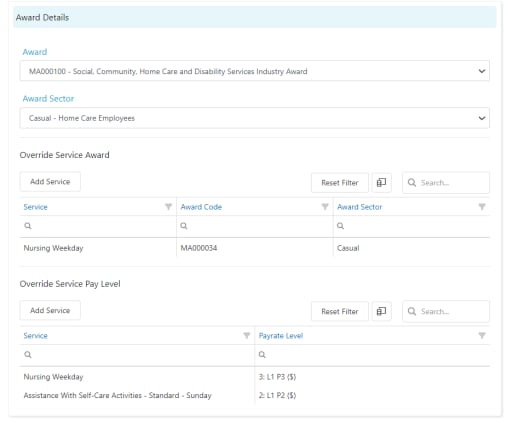
Award interpreter settings
The award interpreter settings are configured in Settings → Data Export → Award Interpreter.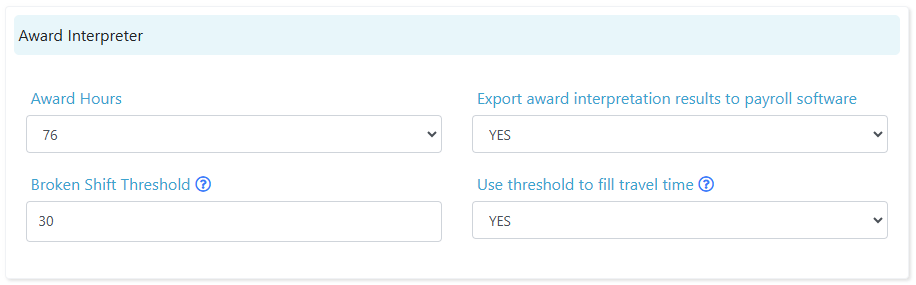
How award interpretation works
When you process a payroll export, Visualcare applies the following logic:- The worker’s award determines the base conditions (overtime thresholds, penalty rates, broken shift rules)
- The worker’s pay level (from their Finance tab) determines the base pay rate tier
- Any service-level overrides (from Engagement Details) adjust the pay level for specific services
- The award interpreter settings control how conditions like overtime and broken shifts are calculated
Running into issues?
See Finance troubleshooting for common errors and fixes.Related articles
Exporting payroll data
Step-by-step guide to exporting timesheet data to your payroll software
Claiming and invoicing overview
Overview of all billing and export options in Visualcare
Kilometres sync
Export and manage kilometre data for billing and reimbursement
Billing to accounting software
Export invoices to your accounting platform