
What you’ll need
- Access to the worker’s profile in vCore
- The worker’s end date
Instructions
1
Open the worker profile
Go to Workers → Profile and search for the worker. Double-click to open their profile.
2
Record the end date
Navigate to the Engagement Details tab in the lower section of the screen. Enter the worker’s End Date in the engagement details.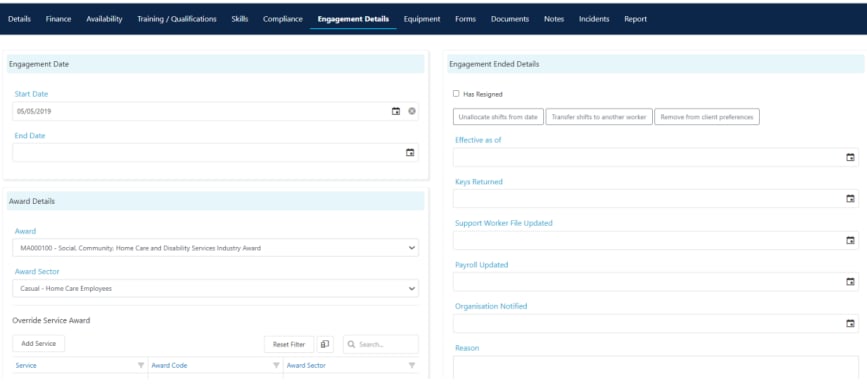
3
Untick the Current box
In the worker profile header, untick the Current box. This removes the worker from rostering selection lists.
4
Save the profile
Click Save at the top of the profile to apply the changes.
5
Review outstanding items
Before completing the offboarding, review the following:
- Shifts - check for any allocated future shifts and reallocate them to other workers
- Leave requests - resolve any pending leave requests
- Compliance items - note the status of compliance items for your records
- Documents - download any documents you need to retain separately
- Mobile app access - the worker’s vWorker and vOnboard access is tied to their profile. Once marked as not current, they lose access to scheduled shifts, though you may also want to untick Web Enabled for additional security
Revoking app access
When a worker leaves, untick the following options on their profile to remove all system and app access:
Open the worker’s profile, untick each of the above options, and click Save.
Running into issues?
See Worker management troubleshooting for common errors and fixes.Related articles
Engagement details
Manage worker engagement and award details
Creating a worker profile
Set up a new worker in Visualcare
Leave requests
Manage worker leave requests