
Enabling access in vCore
To give a client access to vAboutMe, update their client profile in vCore with the following fields, then click Save:
Click Send Login Details to email the client instructions on how to log in.
Contacts can also be given vAboutMe access. Enable the same fields on the contact’s record to give a family member, carer, or other contact access to the app.
App setup
System requirements
The client’s device needs one of the following:- Android: version 10 or above
- iOS: version 11 or above
Installing the app
Download vAboutMe from the App Store (iPhone) or Google Play (Android). Search for vAboutMe and select Install.
Logging in
Open vAboutMe by selecting the icon on the device home screen. Once logged in, the app stays logged in.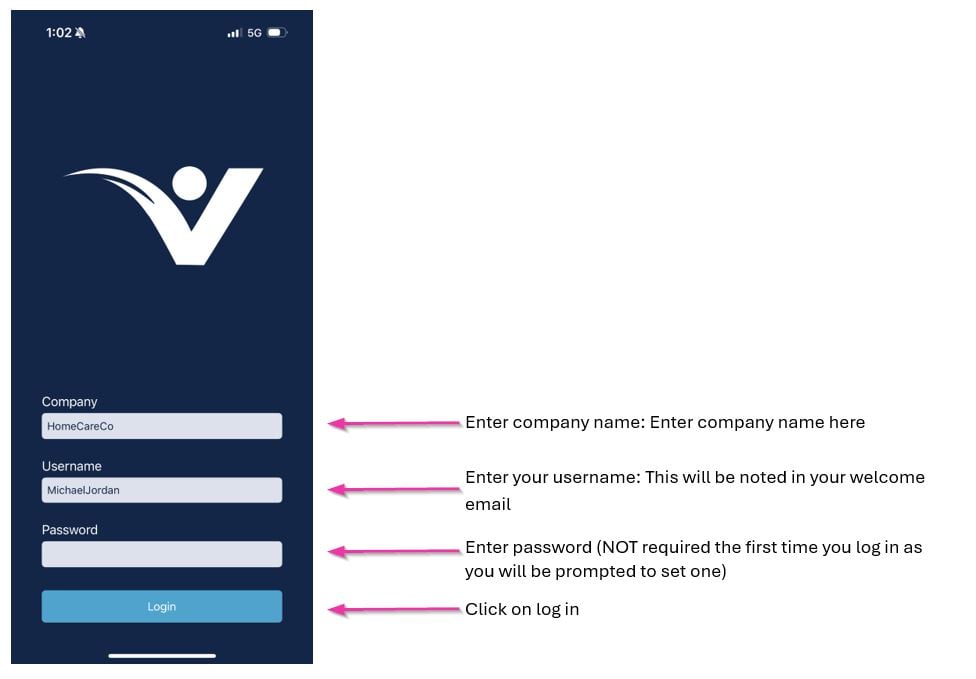
Running into issues?
See Client management troubleshooting for common errors and fixes.Related articles
Creating a client profile
Configure the client profile fields needed for vAboutMe access
Messaging
Send messages to clients through the messaging module